Enterprise Design System: Design for What Already Exists
See how CodeLink built a scalable enterprise design system balancing brand consistency, documentation, and engineering alignment.

Key takeaways
-
A component library may stop being sufficient once a platform develops complex, domain-specific workflows and interaction states.
-
Enterprise design systems need more than reusable UI components; they also require foundations, usage principles, documentation, and engineering alignment.
-
Flexible component primitives can scale better than trying to pre-build every possible screen or variation.
-
AI can reduce repetitive design work, while design judgment and governance remain human responsibilities.
-
Documentation and cross-functional collaboration help the system remain usable beyond the people who originally created it.
Enterprise platforms rarely offer the luxury of starting from scratch.
One of our clients operates in the development banking sector, where platforms are dense, data-heavy, and used daily by finance professionals who depend on precision and reliability.
The organization’s brand guidelines had been created more than a decade earlier, primarily for print, while the existing interface relied on an off-the-shelf component library that no longer matched the platform’s growing complexity.
Before partnering with CodeLink, another agency had spent more than three years working toward a new system. CodeLink joined the engagement with an 18-month delivery timeline and a clear objective: modernize the experience without discarding what still worked.
When a Component Library Is No Longer Enough
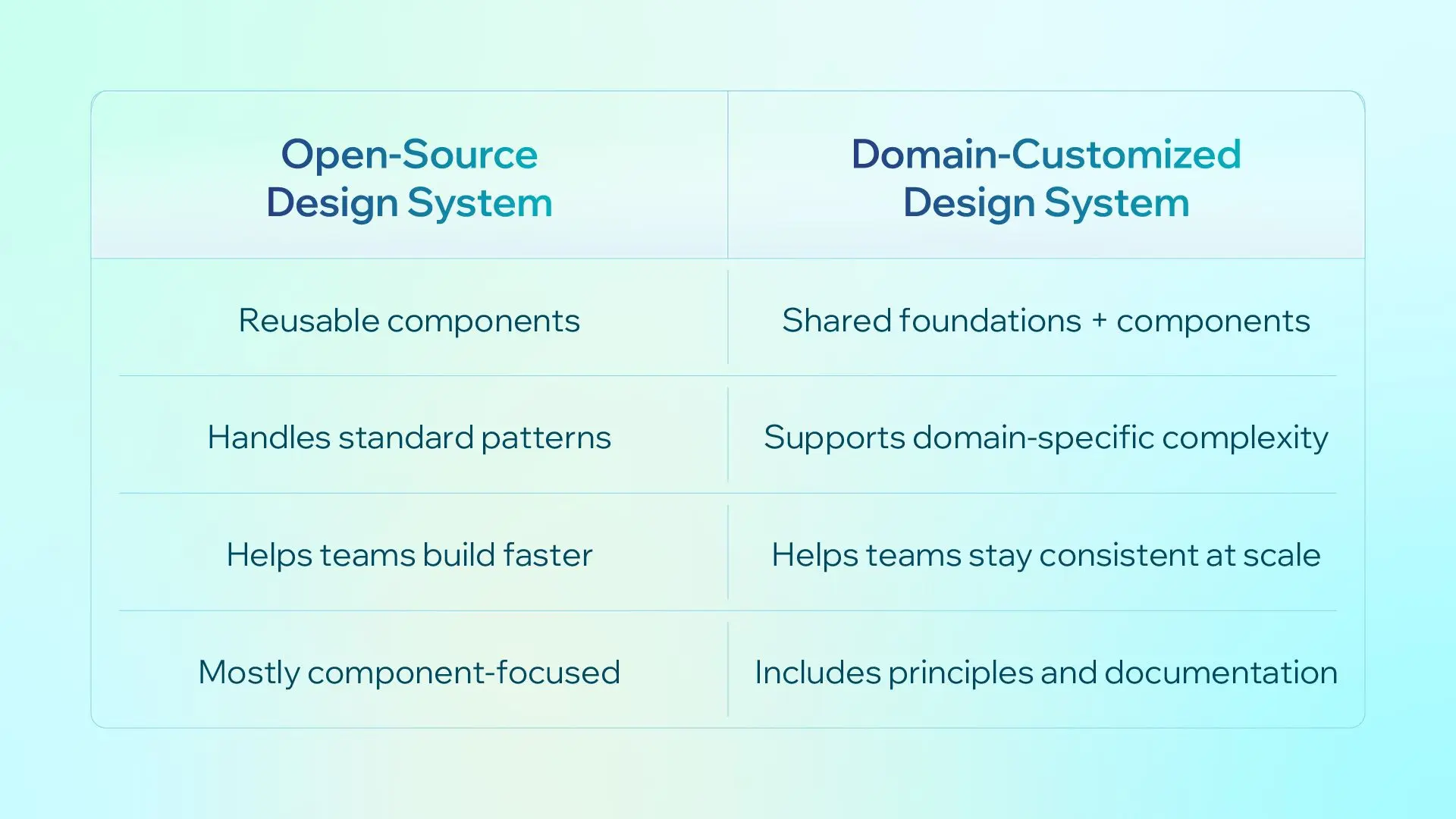
A component library in open-source design systems (Material, Ant Design, Shadcn, etc.) works well when product requirements remain relatively standard.
The calculation changes once your product's complexity outgrows what these libraries were designed for, which was exactly our client's situation. An enterprise design system becomes more valuable in this situation.
Our Context
Our client already had a component library in place, and it was the right starting point for where they were years ago. As the platform grew, it was ready for a foundation built to carry the weight of what it had become.
The scope was large by any measure: a full internal platform spanning project management, human resources, and finance, used daily across the organization. Working alongside the client’s team, CodeLink brought four product designers, 30 developers, and project and delivery management support to the 18-month engagement.
The client’s brand guidelines remained an important foundation, but they had been created for print and marketing materials. Naturally, they didn't cover how a color should behave in a dense data table, or what "on-brand" means for a focus state on an editable cell.
The challenge was therefore not to replace the brand, but to extend it into a coherent digital design language.
Building the Design System
An enterprise design system should combine shared foundations, reusable components, usage principles, and documentation so design and engineering teams can apply consistent rules across a complex product.
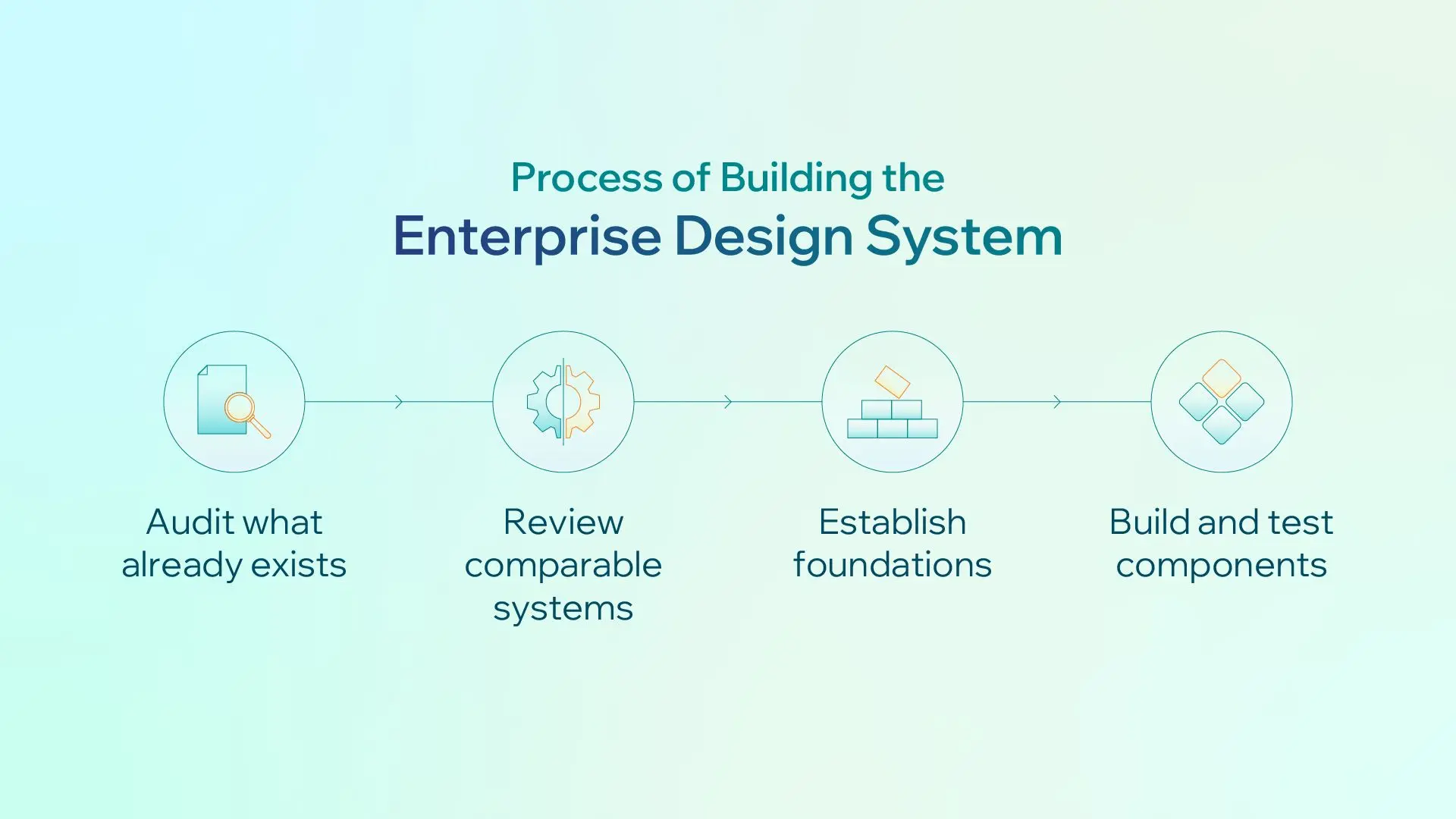
Once the problem was clear, the process was straightforward to define. Execution was more iterative.
-
Start with an audit: Given the tight timeline, the groundwork began early. The team reviewed the existing platform screen by screen to catalogue components, how they behaved, and where limitations or inconsistencies had emerged.
-
Review comparable systems: Other design systems in similar domains, along with the client’s other digital platforms, were reviewed to identify recurring patterns and understand how the existing brand was already being applied.
-
Establish the foundations: Color, typography, iconography, radius, and other design foundations were translated from the client’s decade-old brand guidelines into rules for the digital product.
-
Build and test components: These foundations informed a component inventory covering both elements that needed rebuilding and new components likely to be required as the platform evolved.
Components were tested against real screens and anticipated future use cases. The process remained iterative: audit findings led back to the foundations, while testing revealed requirements that were not visible at the start.
The design system therefore evolved alongside the platform rather than being treated as a fixed deliverable.
One Cell, Infinite Tables
If one component captured the complexity of this system, it was the table.
The audit of the existing product showed that a table was never really one component. There were hundreds of possible combinations: editable cells, read-only cells, error states, focus states for plain text versus a dropdown, and every domain-specific variation layered on top. We also couldn't be sure we had seen every case that would eventually appear. New screens, new data types and new edge cases were always going to surface throughout development, not just after launch.
A finished, ready-to-use table component, the kind a designer could simply drop onto a screen, wasn't realistic. So the team went a level deeper. Instead of designing tables, we designed cells: a set of variants covering the states we already knew about and the ones we could reasonably anticipate, all built on the foundations already in place.
Alongside the cells, we agreed on a set of principles for designers to follow whenever they built a table. These covered how to visually distinguish an editable table from a read-only one, how an error should look on a single cell versus an entire row, and how focus should behave differently for a text cell and a dropdown cell.
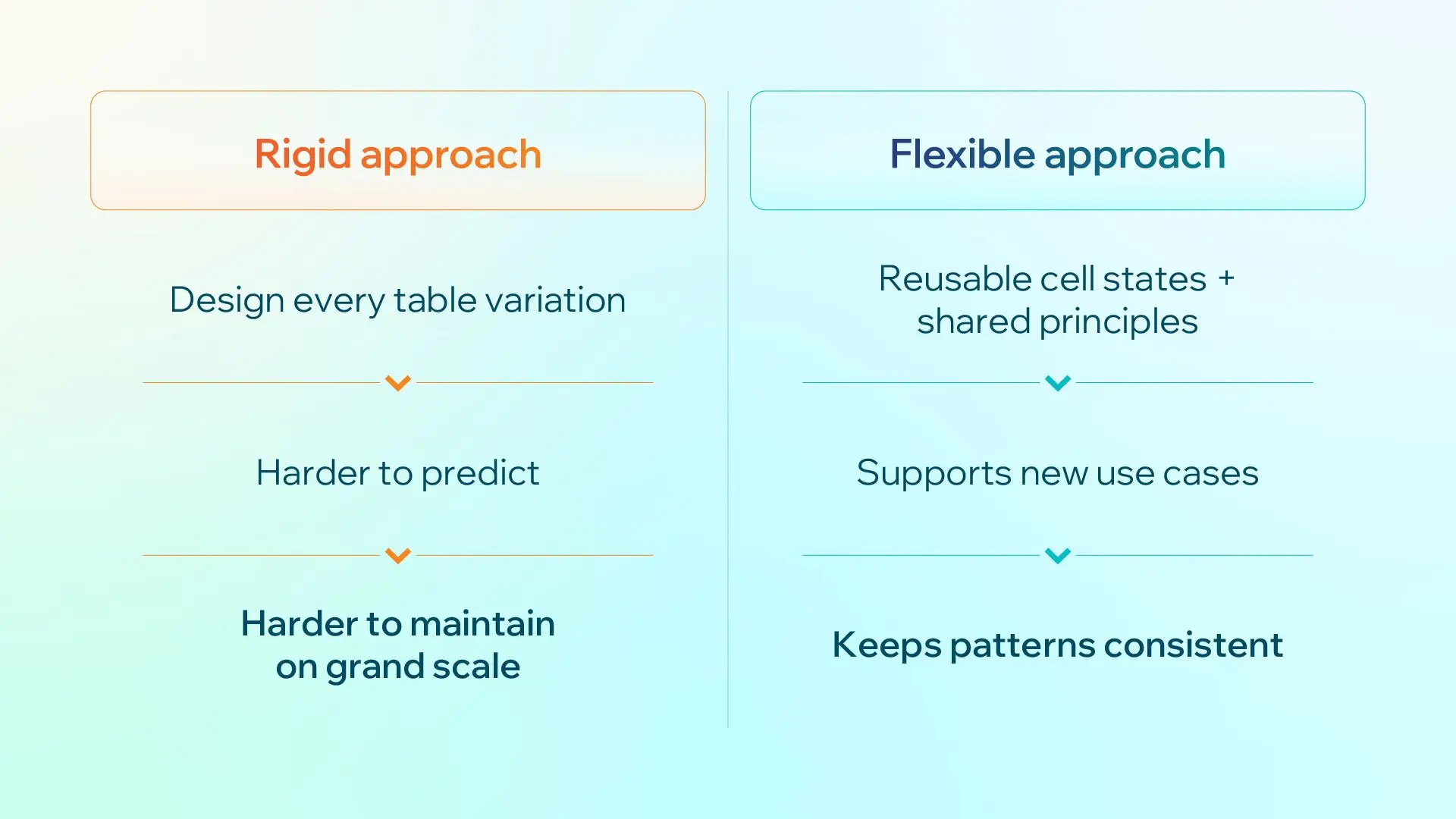
The result wasn't a table component in the traditional sense, but a system for building tables: consistent where it mattered, flexible enough to handle a case nobody had thought of yet, and, most importantly, easy for any designer to pick up and use correctly, not just the one who built it.
Let AI Reduce Repetitive Work
It wasn't possible to know upfront how complex the system would become, how many variants an input would need, or how many states it would have to support. For components with many potential use cases, the team deliberately over-provided, then planned a second audit to remove what went unused.
This is where AI became genuinely useful, not as a replacement for design judgment, but as a way to remove the manual labor that judgment doesn't require.
-
Building foundations: The foundations were built on variables. AI generated variable structures and handled bulk edits, freeing the team to focus on design decisions.
-
Generating component variants: For components with dozens or hundreds of variants, AI generated the initial sets and reduced the risk of missed properties or inconsistent constraints.
-
Supporting research and prototypes: AI also summarized patterns across other design systems and populated prototypes with real client data. Using client-provided spreadsheets, including calculations and currency conversions, reduced manual setup while keeping prototypes realistic.
If you're considering this for your own team: get sign-off first. Letting AI touch your design system directly is a bigger ask than it sounds like, so check with your client, your manager and your engineers before you proceed, not after. AI can speed up execution, but the decisions about what the system should actually be are still your job.
Documentation and Engineering Alignment
A scalable design system cannot depend on knowledge held by its original creators. Documentation gives teams the context to understand not only which components exist, but how and when to use them.
This was especially important for the table and cell work. Cell variants alone were not enough; designers also needed clear principles for editable, read-only, focus, and error states. Without them, each designer would have to recreate that judgment, risking inconsistencies across screens.
Design system documentation alone is not enough. An enterprise design system must also work in code, which requires close alignment between design and engineering.
Ideally, designers and engineers work through component behavior together rather than relying on a finished-spec handoff. Designers define the intended behavior, while engineers surface technical constraints, implementation costs, and more practical approaches. Issues that might otherwise take days of back-and-forth can often be resolved much earlier.
This engagement’s pace and structure meant this collaboration was not always consistent. One key lesson was clear: the earlier design and engineering align on what is practical to build, the less rework is required later.
Designing With Domain Expertise
Working in a specialized domain means dealing with terminology and business logic that may not be immediately familiar.
In this project, a Business Analyst on the client side helped translate and validate that logic before design decisions were built around it. The principle was simple: verify assumptions early, because seemingly reasonable interpretations can prove incorrect later.
Alongside that, the design team worked across different platform modules that shared the same shell, layout, and design principles while supporting distinct use cases. Weekly design sessions helped surface complex issues, align on component changes, and keep new UX patterns consistent across modules. Whenever a new UX pattern showed up in one module, this was where the team aligned on it, so no one ended up interpreting the same principle differently in isolation.
Design doesn't happen in a vacuum. It involves a wide range of people: different departments, different opinions, different ways of working, often very different levels of design fluency. A few principles helped, and they hold up beyond this one project:
-
Explain the reasoning, not just the decision: People trust a decision they understand far more than one they're simply handed, even if they wouldn't have arrived at it themselves.
-
Use the audience’s language: When stakeholders aren't technical or design-literate, translate the decision into concrete scenarios and user examples rather than specs or design terminologies.
-
Keep debate short: When discussion stalls, a quick prototype can make trade-offs clearer than further argument.
-
The client has the final call: Even after all of this, things won't always go the way a designer would choose, and that's fine. Respecting that ownership is part of building trust, not a compromise.
Beyond the Finish Line
The platform is set to launch in September 2026. In April 2026 demos and workshops, more than 70% of users found the new platform clearer and easier to use. Others were still adjusting, particularly those familiar with the old interface. Their feedback has since informed further improvements.
That split isn't a failure, and it's worth saying so plainly. Enterprise redesign is also change management, especially when users have relied on the same interface for years. Comfort takes longer to earn than approval does.
What can be said with more confidence is what got built: a system that respects a decade-old brand while finally giving it digital foundations, a component approach that can flex to a domain too complex to fully predict in advance, and a team, designers and developers both, positioned to keep building on it rather than starting over again in a few years.
Key lessons:
-
Build on what already exists: Most systems inherit something; an old brand guideline, an existing component library, years of undocumented decisions. The job is to figure out what still holds and what needs rebuilding.
-
Build for what cannot yet be predicted: The full complexity of a system rarely becomes clear upfront. Over-provide where necessary, then refine once real usage makes the gaps clearer.
-
Use AI to remove labor, not judgment: AI is useful for repetitive, error-prone work, but decisions about the system still require human judgment and the right approvals.
-
Design for the person who did not build it: The system should be understandable and usable by future designers, engineers, and stakeholders. That requires clear documentation, principles, and communication.
-
Respect the timeline and the people involved: Close collaboration with engineers, domain experts, and stakeholders reduces rework and keeps decisions aligned.
Khanh Vo
Product Designer
Khanh Vo is a seasoned Product Designer with 10+ years of experience, transitioning from a strong foundation in Graphic Design to a deep expertise in Product Design.